
A product requirements document (PRD) is a short, shared description of what you are building, for whom, why, and how everyone will know it works. To write one, work in this order: the problem, the users, goals and non-goals, the requirements, and the acceptance criteria. Then cut it to the smallest useful first version and get feedback before anyone starts building. The rest of this guide shows how, with a template outline you can copy and a worked example.
Key takeaways
- Start with the problem and the evidence for it. A PRD that opens with features has skipped the hard part.
- Write non-goals as carefully as goals. Saying what you will not build prevents more arguments than any other section.
- Make every requirement testable by someone who did not write it. “Fast” is a wish; a measurable condition or observable result makes it testable.
- Keep the PRD strategic and let user stories and tickets carry the day-to-day detail.
- Treat the document as a living thing with an owner, a status and a change log, not a one-time deliverable.
What a PRD is for (and what it is not)
The job of a PRD is alignment. Design, engineering, QA, marketing and leadership read the same page and agree on the problem and the shape of the solution before expensive work begins. The most streamlined versions cover the product’s purpose, goals, features and release criteria, and many teams extend that when the project is complicated or regulated.
A PRD is not a specification of every pixel, and it is not a backlog. The Agile Alliance explains that user stories are small functional increments a team delivers in consultation with the customer or product owner. They serve collaboration and incremental delivery. The PRD sits above them and gives strategic and technical context. When teams try to turn the PRD into a giant pile of pre-written stories, they tend to end up with documents that get written and never read.
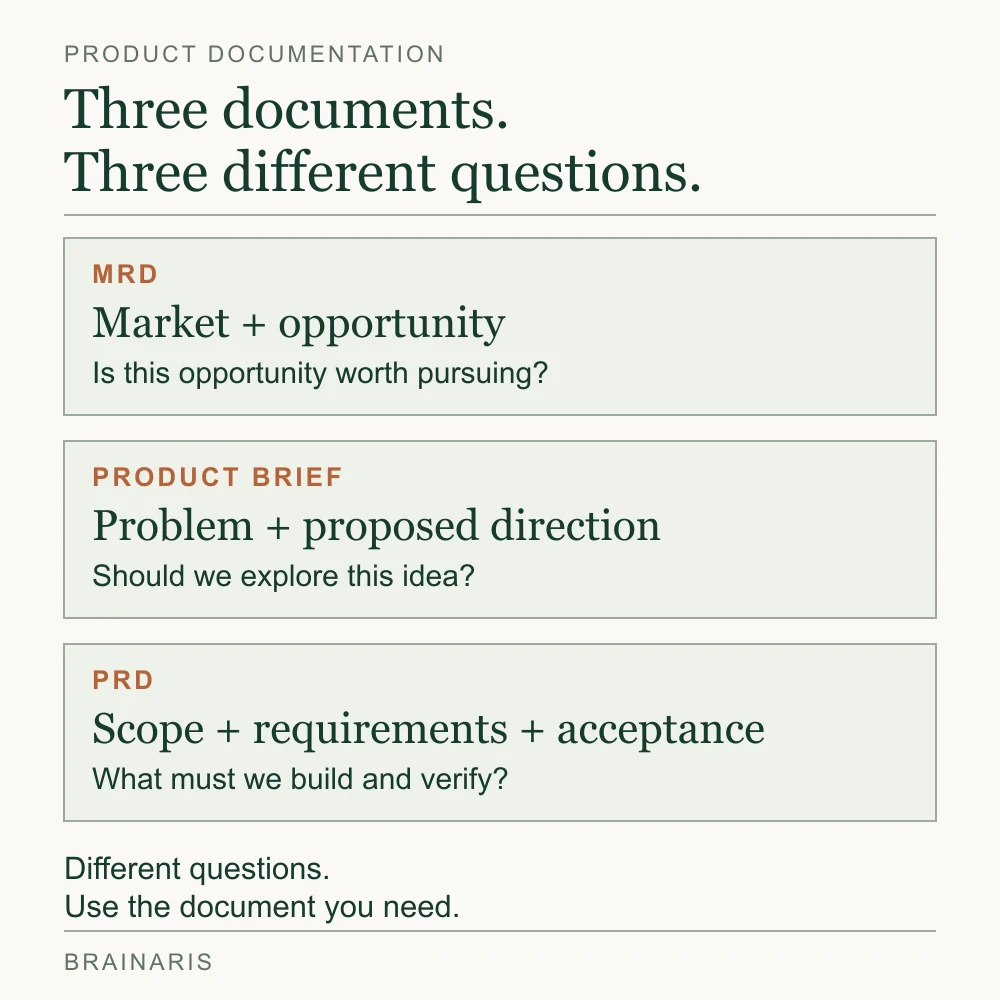
PRD, MRD and product brief
Three documents get confused:
- Market requirements document (MRD): focuses on the market and the opportunity. The MRD is about understanding the market, while the PRD details what to build. If you are still asking whether the opportunity is real, you want an MRD or similar discovery work first.
- Product brief: a one-page pitch. Use it to get a go or no-go before you invest in a full PRD. It covers the problem, the audience, a rough solution and a success measure.
- PRD: the document that turns an approved idea into clear requirements the team can build and test against.
In a small team, one document often plays all three roles. That is fine. Just be honest about which question the page is answering.
Before you write: gather four things
Ten minutes of preparation saves hours of rewriting.
- Evidence. Interview notes, support tickets, analytics, sales call comments. Every claim in the problem section should link to something real.
- The decision-makers. Know who must approve the document and who must be consulted. Name them on the page.
- Constraints. Deadline, budget, platform limits, legal or privacy requirements, dependencies on other teams.
- A success measure. One metric you can read after launch. If you cannot name one, the problem is not yet understood.
The seven steps
1. Set the header: owner, status, date
Put a name on the document. Add a status (draft, in review, approved), a last-updated date and the target release. Template headers commonly start this way, with feature name, owner, status and date, because a PRD without an owner goes stale first. Add a short change log at the bottom so people can see what moved since they last read it.
2. State the problem in plain words
Write one or two sentences on what you are building and why now, then a short section on the problem and its evidence. Describe the situation of the customer, not your solution.
Weak: “Users need two-factor authentication.”
Better: “Account takeovers account for 38% of our support escalations this quarter (support export, linked). Customers in finance and healthcare accounts have asked for stronger sign-in in nine of our last twelve renewal calls.”
The numbers above are an invented illustration of the format, not real data. Yours should link to your actual sources.
3. Define the users
Name the two or three groups who will touch this feature, and what each is trying to get done. You do not need long persona biographies. A line such as “workspace admin who must enforce security policy for 50 to 500 people” is enough if it changes a decision. If a persona never changes a requirement, delete it.
4. Write goals, non-goals and success metrics
Goals say what success looks like. Non-goals say what this release deliberately will not do. Both belong in the document.
- Goal example: reduce account-takeover support tickets by half within 90 days of launch.
- Non-goal example: we will not support hardware security keys in this release.
Non-goals are where scope fights get settled early, in writing, instead of late, in a meeting. Pair each goal with a metric, a baseline and a time window.
If the scope depends on buying an external capability, record that dependency before estimating delivery. Our build vs buy guide helps separate implementation effort from ongoing cost and ownership.
5. Write the requirements
List what the product must do. Group requirements by user journey or capability, number them so people can reference them, and mark each as must-have, should-have or later.
Good requirements describe behavior and outcomes, not implementation. “The user can enroll an authenticator app by scanning a QR code” tells engineers what to deliver while leaving room to choose how. “Use library X with a Redis session store” belongs in a technical design, unless it is a genuine constraint.
Include what teams forget: error states, empty states, permissions, accessibility, analytics events, and what happens to existing users when the feature ships.
6. Add acceptance criteria
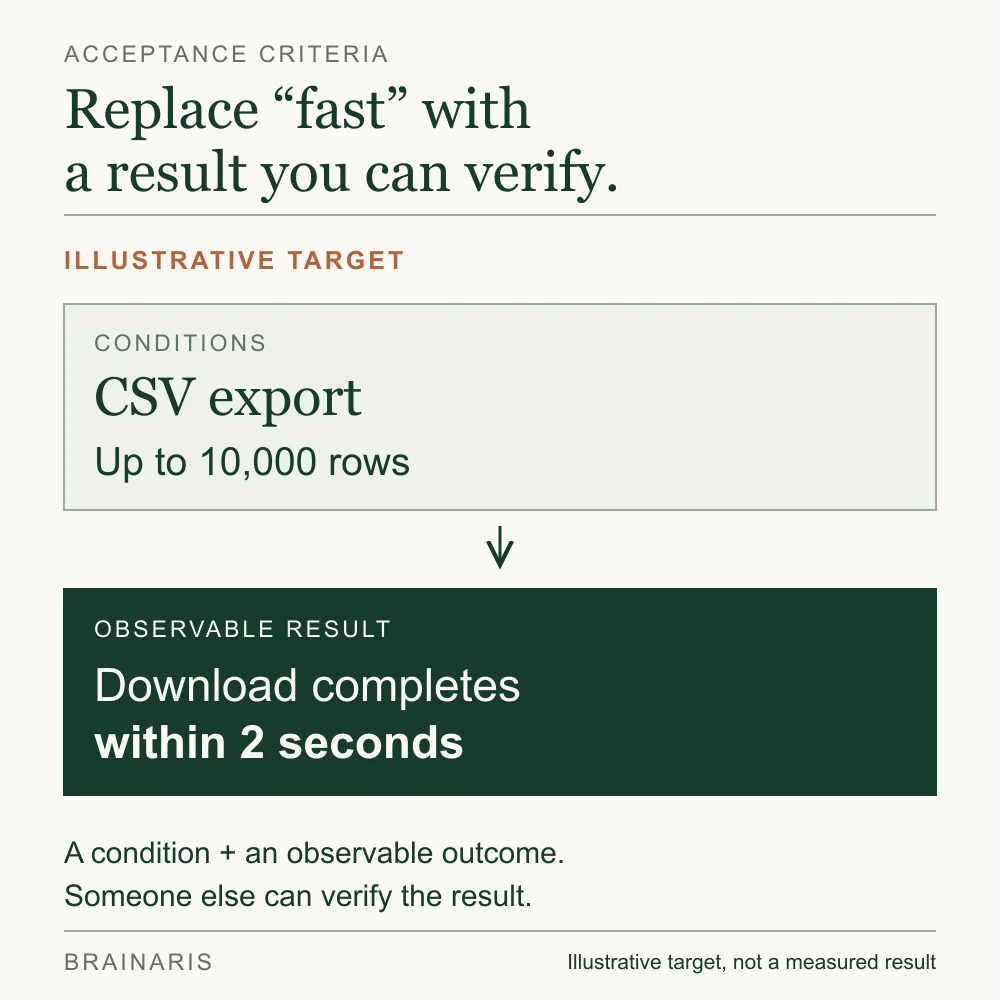
This is the step that separates a useful PRD from a vague one. Acceptance criteria are testable statements that someone who did not write the document can verify. For example, replace “fast export” with a provisional target: a CSV of up to 10,000 rows finishes within two seconds under agreed test conditions. Specify whether the clock includes queue time, report generation and download.
A quick test for each criterion: could a QA engineer or a designer who joined yesterday check it without asking you what you meant? If not, rewrite it with a number, a condition or an observable result.
For user-story-sized pieces, the same source points to the INVEST checklist (independent, negotiable, valuable, estimable, small, testable) as a way to check quality. Use it on the stories that grow out of your PRD, not on the PRD itself.
7. Cut it down, then share it
A common failure is a first version stuffed with features that are not strictly necessary. Practitioners handle this with a “later” or backlog list where non-essential items go, so the PRD describes something shippable rather than a wish list. Cutting scope is the discipline that makes the document useful.
Then circulate it. Ask engineering what is risky, design what is unclear, and support or sales what customers will actually do. Collect open questions in a visible list with an owner and a due date, and do not mark the PRD approved until the blocking ones are answered.
A PRD template outline you can copy
This outline fits most feature-level work. Delete what you do not need.
| Section | What goes in it | Length |
|---|---|---|
| Header | Title, owner, status, last updated, target release, approvers | 5 lines |
| Overview | What and why now | 2 sentences |
| Problem and evidence | Customer problem, linked data, quotes | 1 short section |
| Users | Who it is for and what they need to get done | 2 to 3 bullets |
| Goals and metrics | Outcomes, metric, baseline, target, time window | 3 to 5 bullets |
| Non-goals | What is explicitly out of this release | 3 to 6 bullets |
| Requirements | Numbered, prioritized, grouped by journey | The main body |
| Acceptance criteria | Testable checks per requirement | Alongside requirements |
| Design and technical notes | Links to designs, constraints, dependencies | Links, not copies |
| Risks and open questions | Owner and due date on each | A short table |
| Launch plan | Rollout, communication, support readiness | 4 to 6 bullets |
| Later | Ideas parked for future versions | A list |
If you prefer to start from a ready-made page, the Atlassian Confluence guide walks through a PRD that begins with a table covering release date and team roles. Whatever you pick, change it to match how your team actually decides things.
A short worked example
Here is a compressed feature PRD, a scheduled CSV export for a reporting tool. The details are illustrative.
Overview. Let admins schedule recurring CSV exports so they stop downloading the same report by hand every Monday.
Problem. Admins repeat the same manual export weekly (evidence: link to five interview summaries and the relevant support tag).
Goals. Move 30% of eligible weekly active admins to a successful scheduled export within 60 days. Cut manual export support requests by a quarter.
Non-goals. No export to cloud storage in this release. No custom column ordering.
Requirements.
- R1 (must): an admin can create a schedule (daily, weekly, monthly) for any saved report.
- R2 (must): exports arrive by email as a download link that expires after seven days.
- R3 (should): an admin can pause or delete a schedule.
- R4 (later): delivery to a shared folder.
Acceptance criteria for R1. Using the admin’s selected time zone in this example, a scheduled job starts within five minutes of the specified time. A report of up to 10,000 rows is ready within two seconds of the job starting. Treat that performance target as provisional until engineering defines the dataset, environment, concurrent workload and measurement boundary. A failed run notifies the admin and retries once; the team must define which failures are retryable and how duplicate delivery is prevented.
The example becomes more useful when someone can follow the same requirement from its evidence to the launch review. The references and targets below are illustrative placeholders, not findings from a customer project.
| Connection | Record in the PRD | What the team can check |
|---|---|---|
| Problem evidence | Link the interview summaries and support records showing repeated manual exports. | Does the evidence describe the admins and reporting task this release will serve? |
| Requirement R1 | An authorized admin can schedule a saved report. | Which report permissions are needed, and what happens if access is revoked before a run? |
| Acceptance | Save a weekly schedule and verify its next run, job start and report readiness. | Check the agreed time zone, timing conditions, failure notification and retry behavior. Resolve daylight-saving behavior before approval. |
| Launch metric | Eligible weekly active admins with at least one successful scheduled export, divided by all eligible weekly active admins. | For this example, eligible admins can export at least one saved report. Count both groups in the same weekly window. Track failed runs separately; creating a schedule alone does not demonstrate successful use. |
The launch metric checks whether the proposed behavior is being used. The acceptance checks establish whether it works as specified. Neither proves the other. The existing 30% adoption target and 60-day window are illustrative too; agree on a baseline and measurement plan before treating them as commitments.
Open questions. Which time zone applies to workspaces spanning several regions? Owner: product. Due: before design review.
Notice what is absent: no button colors, no database schema, no sprint plan. Those live in design files and tickets that link back to the PRD. Our trunk-based development guide splits a scheduled-export feature into small changes and shows what remains usable after each merge.
Mistakes that make PRDs fail
- Starting with the solution. If the problem section reads like a feature description, you will defend the feature instead of testing the idea.
- No non-goals. Everyone silently assumes their favorite extra is included.
- Unmeasurable language. Words like fast, intuitive, simple and robust invite argument. Replace them with thresholds.
- Writing alone. A PRD written without engineering input can hide constraints that change the cost or feasibility of the work.
- Over-length. A 25-page document gets skimmed. Link out to research and designs instead of pasting them in.
- Never updating it. If scope changes in a Slack thread and not in the document, the PRD becomes fiction. Update the page, note the change in the log, tell the team.
- Confusing it with a contract. The PRD is a shared understanding. It should change when you learn something, with the owner’s name on the change.
Our perspective: write the shortest PRD that removes doubt
A useful test is whether a new teammate can read the page in ten minutes and correctly say what is being built, what is not, and how the team will tell if it worked. A longer document can still leave those decisions open. Judge the PRD by the uncertainty it removes.
Our view is that a PRD is a decision record before it is a specification. Each section exists to force a decision that would otherwise be made implicitly, usually by whoever builds the thing at 6 p.m. on a Thursday. Problem and evidence force a decision about whether to build at all. Non-goals force a decision about scope. Acceptance criteria force a decision about what done means.
That is also why we would rather you adapt a template than obey it. If your team is three people shipping weekly, a one-page brief with a goal, non-goals and five acceptance criteria may be the right PRD. If you are touching payments or health data, you will want more rigor. Match the document to the cost of being wrong.
Where Brainaris fits
Brainaris publishes practical guides on design, software development, AI and business growth. Browse the latest articles or read our editorial policy for how we approach sources, corrections and product decisions.
FAQ
Who writes the PRD?
Usually the product manager, product owner or founder who owns the problem. Writing it does not mean writing it alone: design, engineering and QA should contribute and review. The owner is accountable for the document staying accurate.
How long should a PRD be?
As long as it takes to remove doubt and no longer. For a single feature that is often one to three pages, with links to research and designs. Larger or regulated initiatives justify more, but if people stop reading it, it is too long.
What is the difference between a PRD and user stories?
The PRD gives the strategic and technical context: the problem, goals, scope and release criteria. User stories break the work into small increments the team delivers and refines together, as the Agile Alliance describes. A team can use the PRD to develop and refine its stories, while keeping the broader goals and scope visible. That is a useful workflow, not a required sequence for every team.
Do agile teams still need a PRD?
Most still need something that records the problem, the goal and the scope, even if they call it a brief or a one-pager. The format can be light. What matters is that the team shares a written understanding that can be updated as you learn.
What should I include in a PRD for an AI feature?
Add what is different about AI: acceptable quality thresholds, how you will evaluate outputs, what happens when the model is wrong, and data and privacy constraints. Express each as an acceptance criterion with a number or an observable behavior, just as you would for any other requirement.