
A vector database stores data as lists of numbers called embeddings, then finds the items whose numbers sit closest to your query. That is how an app can return a relevant answer when the words don’t match: a search for “laptop won’t wake up” can surface a page titled “Troubleshooting sleep mode failures.” IBM describes it as a system that stores, manages and indexes high-dimensional vector data. Below we cover how that works, where it fits in a retrieval-augmented generation (RAG) pipeline, and how to decide whether you need a dedicated product at all.
Key takeaways
- A vector database stores embeddings and answers one question quickly: which stored items are most similar to this one? Similarity can approximate meaning, but does not guarantee a useful answer.
- In RAG, the database is one component. Check chunking, embedding quality and source freshness alongside raw query speed.
- If you already run PostgreSQL or another mature database, adding vector search there can be a low-friction start. Dedicated systems earn their place when their capabilities or operating model meet requirements your existing setup cannot.
- Hybrid search, which combines keyword matching with vector search, is a strong baseline to test when users search for exact names, codes and error strings.
- Judge any choice on total cost of ownership and predictable latency, not on a benchmark headline.
What a vector database actually stores
Start with the embedding. An embedding model reads a piece of unstructured data, such as a paragraph, an image or an audio clip, and outputs an array of numbers. Wikipedia’s overview describes the database as one that stores and retrieves embeddings of data in vector space. The model is trained so that items with similar meaning land near each other in that space, and unrelated items land far apart.
Think of it as a map with hundreds or thousands of dimensions instead of two. “Refund policy” and “how do I get my money back” can end up as neighbors on the map even though they share no words. Literal keyword matching can miss that paraphrase. Vector search uses geometry to find candidates, and it can run inside a relational database as well as a dedicated service.
What separates a vector database from a plain array of numbers in a file is the set of database features around it. Typical ones include:
- Indexing so you don’t compare the query against every stored vector.
- Metadata filtering, such as “only documents from this customer, published this year.”
- Create, read, update and delete operations, so content can change without rebuilding everything.
- Persistence and scaling, so the index survives restarts and grows with your data.
The same capabilities now ship in several kinds of products: purpose-built vector databases, relational databases with extensions, and search engines with vector fields. That overlap is why the “which one” question is harder than the “what is it” question.
How a query moves through the system
The flow is the same whichever product you pick.
- Prepare the content. Split documents into chunks of a sensible size. A whole-document embedding can obscure the passage a query needs, and model input limits may require splitting the document.
- Embed each chunk. Send it to an embedding model and get a vector back.
- Store the vector with its metadata. Keep a reference to the source document, the chunk position, permissions and a content version or timestamp.
- Embed the query. Use an encoder compatible with the stored vectors, including the intended embedding space, dimensions and preprocessing. Some models use distinct query and document prompts. Changing models or versions may require rebuilding the stored embeddings.
- Search for nearest neighbors. The database returns the top results by a similarity measure, commonly cosine similarity or dot product, optionally restricted by metadata filters.
- Use the results. Show them as search results, feed them to a language model as context, or use them to recommend related items.
A running example: support search for a shared product. Imagine a help center with public troubleshooting articles and private notes for two customers. A user asks, “Why won’t my laptop wake up?” The expected source is the current sleep-mode article. Another user enters “E-4021,” where the exact identifier matters. A third asks about a customer-specific configuration. A similar note belonging to the other customer is never an acceptable result.
For each chunk, keep a source ID, chunk ID, content version, embedding-model version and access-control metadata alongside the vector. These fields let the application trace a result, replace an outdated passage and apply access rules. The embedding finds a candidate; it does not establish who may read it.
Use the model’s intended similarity measure. Cosine compares direction, inner product also reflects vector magnitude, and L2 measures distance. Their rankings agree for unit-normalized vectors, but not arbitrary embeddings. See the Faiss metric documentation.
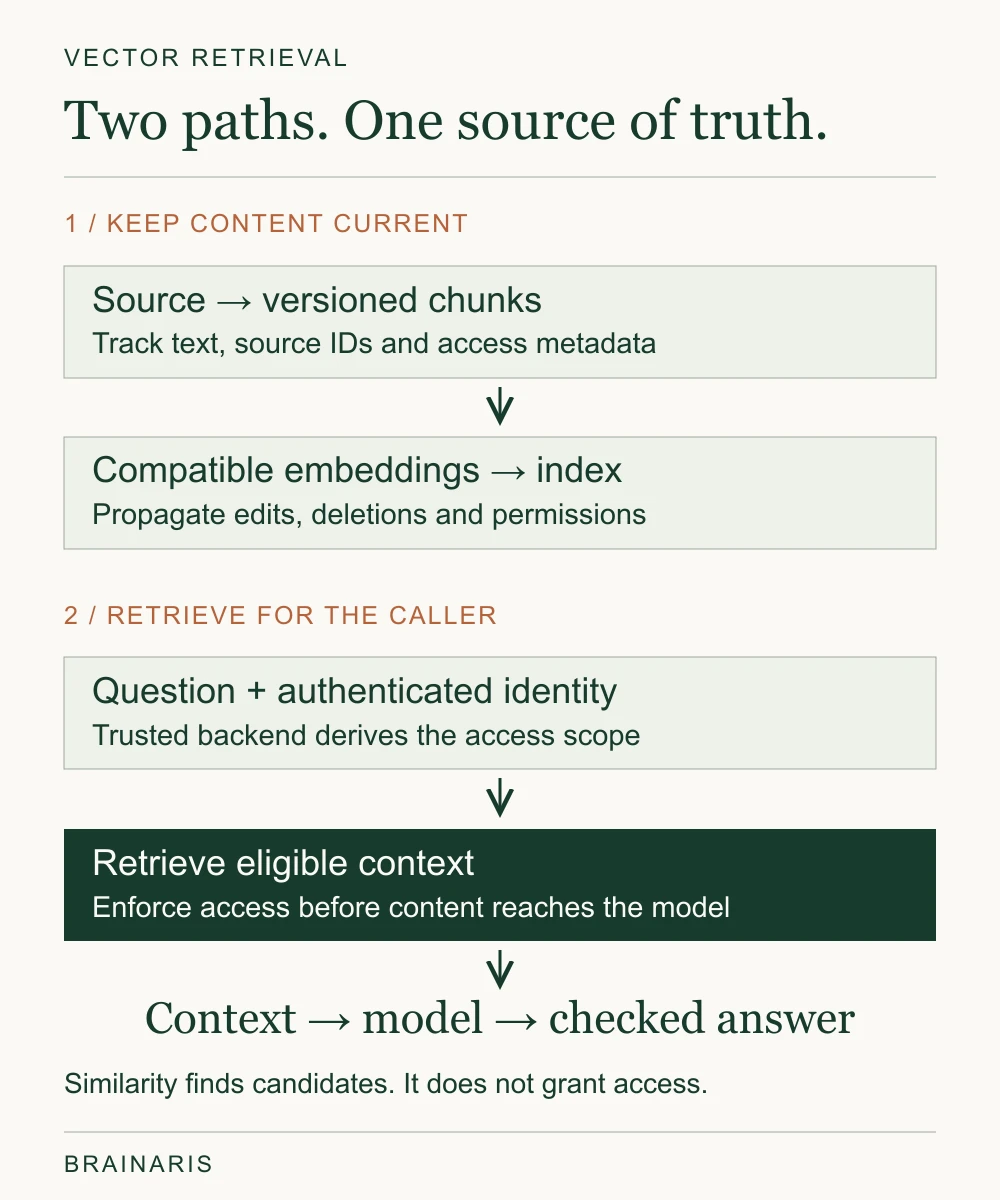
If the wrong passage was embedded, its permissions are outdated or the result is used badly, changing the index alone will not repair the feature.
Why the search is approximate, and what an index does
Vector search can be exact or approximate. Exact search provides a useful baseline, but comparing every eligible vector can become expensive as the workload grows. Approximate nearest neighbor (ANN) indexes trade some neighbor recall for faster retrieval. Here recall means how many of the exact nearest neighbors the approximate search returns. It does not measure whether those neighbors answer a person’s question. pgvector uses exact search by default and supports optional ANN indexes.
One widely used approach is graph-based indexing. HNSW, short for Hierarchical Navigable Small World, builds layers of graphs: you enter at a sparse top layer, hop toward the query, then descend into denser layers until you converge. It is popular because it delivers high recall at low latency, at the price of memory.
It is worth knowing the research is not settled on whether the hierarchy is needed. A paper titled “Down with the Hierarchy” found that on high-dimensional datasets a flat navigable small world graph matched the original algorithm’s latency and recall, with less memory overhead in the tested implementations. The authors caution that implementation differences may explain part of that memory result. The practical lesson for a team is modest: don’t assume the fanciest index is the one your workload requires. Start with the simplest index that meets your recall and latency targets, measure on your own data, and tune only when numbers force you to.
Two other index trade-offs show up in practice:
- Memory versus disk. Index design changes memory and storage requirements. At very large scale, disk-based designs matter; research such as B+ANN investigates billion-scale nearest-neighbor search on disk. A research prototype is not automatically a production option available in your database.
- Write rate versus freshness. Query speed alone does not show when changes become searchable. For example, Pinecone documents eventual consistency: a successful write is not immediate proof that queries reflect it. Test inserts, edits and deletions while queries continue, against the feature’s acceptable delay.
There is a more concrete check than waiting a fixed number of seconds. Pinecone’s serverless Database API exposes namespace-specific log sequence numbers for writes and indexed queries. A query sequence number at least as high as the relevant write confirms that operation has reached the query state; later writes can still change the record. Record counts alone can miss updates or equal numbers of inserts and deletes.
Vector databases in a RAG pipeline
In retrieval-augmented generation, a system retrieves relevant material and supplies it to a model as context. Retrieval can use keyword search, vector search, hybrid search or another suitable method. A vector database is one possible component, rather than a requirement for every RAG system. Microsoft’s RAG overview describes these options. Retrieving context does not train the model or guarantee a correct answer.
The database operates inside a larger pipeline. Notion’s engineering account describes separate stages: moving from pods to serverless in May 2024 reportedly halved costs versus peak usage; a later turbopuffer migration and related changes reportedly reduced search-engine spend by 60% and improved p50 query latency from 70–100 ms to 50–70 ms. Those are operator-reported results from different stages, not percentages to add together.
Notion also separated text and metadata changes, so changing permissions did not require re-embedding unchanged text. Its page-state approach reportedly reduced data volume by 70%; that is not the same as a 70% reduction in the total bill. For our support example, updating who may read a passage should not require embedding the same text again.
That suggests where to spend your time:
- Chunking. Chunks that cut a table in half or separate a heading from its text retrieve badly regardless of database.
- Change detection. Hash your source content so only changed pages get re-embedded. Embedding calls cost money and time.
- Metadata and permissions. Store who can see what alongside each chunk. The trusted backend must derive scope from the authenticated caller and enforce it before protected content reaches the user or model. Metadata alone grants no protection; test cross-tenant access and permission revocation. Microsoft documents these enforcement patterns.
- Evaluation. Build a small set of real questions with known good answers and track retrieval quality as you change anything.
Why hybrid search is the default to try first
Pure semantic search is excellent for intent and synonyms and weak for exact strings. Ask for error code “E-4021” or a product SKU and meaning-based similarity may return thematically related pages instead of the one containing that code. Keyword retrieval such as BM25 handles exact identifiers well but misses paraphrases.
Hybrid search runs both and merges the results. A common merging method is reciprocal rank fusion, which combines the ranked lists from each retriever without needing their scores to be comparable. Many vector databases and search engines now offer this natively. If users enter part numbers, names or log lines, include hybrid retrieval in the initial evaluation.
For mixed paraphrases and identifiers, compare hybrid retrieval with both individual baselines. Preserve identifiers in the lexical analysis and verify the merged results; combining two lists does not guarantee better relevance. Microsoft’s hybrid-search documentation explains the parallel retrieval and fusion mechanism.
Real-life examples of vector databases at work
These application patterns show where similarity retrieval can help; the named CORTO and Notion accounts provide production examples with specific operating constraints.
- Semantic site and document search. Matching a question to the right help article without keyword overlap.
- RAG assistants. A support bot that answers from your documentation and cites the passages it used.
- Recommendations. Finding products, articles or songs whose embeddings are near the ones a user engaged with.
- Image and audio similarity. Finding pictures with similar colors or scenes, or tracks with similar sound.
- Deduplication and clustering. Spotting near-duplicate tickets, listings or documents.
- Large-scale professional search. An AWS account of CORTO’s legal search platform describes 7.6 billion vectors in a 46 TB APAC Aurora PostgreSQL-compatible cluster using pgvector. The design uses compact 384-dimensional embeddings, partitioning and firm-scoped partial indexes, with document text and metadata stored separately in DynamoDB. This is a specialized multi-tenant architecture, not a query across all 7.6 billion vectors or a capacity promise for an ordinary PostgreSQL installation.
That last example is useful because it contradicts a common assumption. A relational database with a vector extension can serve very large semantic workloads in production.
Choosing: dedicated, relational extension or search engine
You will find many comparison articles that rank named products on a benchmark chart. Treat those cautiously. Benchmarks depend on dataset, dimensionality, recall target, hardware and filter selectivity, and vendors choose the settings that flatter them. A category-level decision is more durable, and it is the one you make first.
| Option type | Good fit | Watch out for |
|---|---|---|
| Vector extension on your existing relational database | You already run and trust the database; moderate to large scale; you want joins and transactions beside vectors | Engineering effort for partitioning, tuning and scaling; very high query volumes may strain your primary database |
| Dedicated, self-hosted vector database | You need specialized index types, heavy multi-tenancy or very large scale, and have operations skills | You own upgrades, backups, capacity planning and on-call |
| Dedicated, managed vector service | Fast setup, small team, unpredictable early traffic | Ongoing service cost that grows with usage; another system to keep in sync with your source of truth |
| Search engine with vector support | You already run full-text search and want hybrid retrieval in one place | Vector features and tuning may be less deep than in purpose-built systems |
| In-process or embedded library | Prototypes, small datasets, offline tools | You must provide serving, persistence, access control and coordination of updates. Concurrency depends on the library and operation; Faiss CPU indexes, for example, support concurrent read-only searches. |
The embedded-library distinction is about the surrounding service responsibilities, rather than an automatic ban on production use. See Faiss’s threading documentation for its operation-specific limits.
AWS’s guidance distinguishes options by requirements: Aurora PostgreSQL with pgvector for SQL and vector queries together, and OpenSearch when full-text and vector search must coexist. If one of those systems is already operated well by your team, test that path against the same requirements before adding another service.
A reason to add a separate system should name a failed requirement: filtered queries compete with transactional traffic, an operating responsibility exceeds the team’s capacity, or the existing engine misses the agreed quality and latency budget. Record that constraint and what an alternative would change. A vector count alone does not settle the architecture.
What the cost evidence says
Start with a calculation you can reproduce. Suppose the pilot grows to 1,000,000 vectors, each with 1,536 float32 components. The raw coordinates occupy 1,000,000 × 1,536 × 4 = 6,144,000,000 bytes: 6.144 GB, or about 5.72 GiB. This is illustrative arithmetic, not a database footprint or RAM recommendation. Index structures, text, metadata, row overhead, replicas, backups and working memory are additional; the pgvector type also adds eight bytes per vector value before row and index overhead.
| Cost component | Inputs to record | Comparison trap |
|---|---|---|
| Database service | Vectors, dimensions, queries, updates, peak concurrency and availability. | Raw coordinate size is not the billed database footprint. |
| Embeddings and ranking | Initial corpus tokens, changed chunks, query tokens and reranking calls. | A metadata-only edit may need no new text embedding. |
| Operations and recovery | Replicas, backups, retained versions, monitoring and engineering time. | A free extension still requires an operated service. |
| One-time work | Import, export, model migration and index rebuild. | Keep setup and migration outside the recurring monthly total. |
A concrete billing example helps expose the units. As checked on October 20, 2026, Cloudflare’s published Vectorize example uses 50,000 stored vectors, 768 dimensions and 200,000 monthly queries. Its formula gives about US$1.94 per month before included allocations for that Vectorize component. This excludes the Workers base plan and runtime, embeddings, model generation and the rest of the application. It is a provider example, not an observed invoice or a full RAG budget.
Our Build vs Buy guide helps compare the operating responsibilities before treating two monthly totals as equivalent.
The flip side is real too. Self-managing means your engineers carry maintenance, partitioning and scaling. Total cost of ownership includes their time. A managed serverless service can be the cheaper choice for a small team whose traffic is spiky or whose engineers are scarce.
Predictable beats peak
A retrieval benchmark is only part of the feature’s response time. Set the retrieval budget within the application’s overall latency target, then test tail latency under expected concurrency, filters and updates. A lower average can conceal slow requests at p95 or p99. Consistent performance at the required retrieval quality is more useful than a peak number measured under different conditions.
A short checklist before you pick
- Count your vectors honestly. Count chunks, not just source documents. Multiply vector count by dimensions and bytes per component for raw coordinates, then measure index, metadata and database overhead separately.
- List your filters. Per-customer, per-permission and date filters change index behavior and performance.
- Measure write patterns. How often does content change, and how stale can results be?
- Check what you already run. If the answer is PostgreSQL, prototype there first.
- Test with your data. Take 50 to 200 real queries as a practical starting exercise, not statistical assurance. Label useful sources and compare retrieval relevance, ANN recall against an exact baseline, and p95 or p99 latency.
- Estimate total cost. Include the database, embedding calls, re-embedding on updates and engineering hours.
- Plan an exit. Keep source content, chunk identifiers, metadata and embedding-model versions available outside the retrieval index. Estimate export, rebuild and re-embedding work before assuming migration will be cheap.
A permission-aware retrieval check
Use the support example above to make the pilot inspectable. This is a proposed acceptance worksheet, not a report of tests already run. Agree on eligible sources, an acceptable update delay and the application’s latency budget before testing.
Permission synchronization delay must be assessed against the product’s access policy; it is not automatically an acceptable disclosure window. Check enforcement and cached context as well as the index.
| Query or change | Expected behavior | Inspect if it fails |
|---|---|---|
| “Laptop won’t wake up” | The current sleep-mode article appears among useful results. | Chunk boundaries, embeddings and human relevance labels. |
| “E-4021” | The page with the exact error code is retrievable. | Keyword baseline, hybrid retrieval and ranking. |
| Customer A requests a private note | Only sources available to that authenticated user are eligible. | Caller-derived scope and the evidence actually passed to the model. |
| Source content changes or is deleted | Outdated content stops appearing within the stated freshness target. | Versions, ingestion and deletion propagation, and cached results. |
| Access is revoked | Content does not reach a caller or model that is no longer authorized. | Permission synchronization and enforcement, including cached retrieval and context. |
| No authorized source answers the question | The application follows its agreed no-answer behavior. | Evidence thresholds, generation and citation handling. |
Save retrieved source IDs and judge relevance separately from speed. Compare options using the same corpus snapshot, chunks, embedding model and version, distance measure, top-k, filters, concurrency and update stream. For ANN, compare neighbor recall against exact search over the same eligible vectors. pgvector documents an exact-search comparison; agreement with that baseline still does not establish useful answers.
Also test selective filters. In pgvector’s approximate-index scans, filtering after a scan can leave too few results; iterative scans can search farther within configured limits. Other engines implement filtering differently. Write the expected behavior into acceptance criteria before selecting infrastructure. A failed access check cannot be compensated for by a faster benchmark.
Our perspective
The phrase “vector database” can make a capability sound like a product you must buy. In practice it is a capability: store embeddings, search them by similarity, filter them by metadata. Whether that comes from a new system or an extension to one you already run is a business decision about workload, team skills and cost.
Resist the urge to decide the database first. Decide what retrieval quality your feature needs, build a small evaluation set, and let it expose whether the weak link is chunking, freshness, hybrid matching or the index. Choose the simplest option that meets your requirements, keep source data rebuildable, and revisit when a measured constraint changes.
Follow the journal
For more practical product decisions, explore the journal’s published guides. Start with the retrieval acceptance criteria above, bring the cost inputs into the same discussion, and record which requirement would make you revisit the choice.
FAQ
What is a vector database in simple terms?
It is a database built to store embeddings, which are numeric representations of text, images or audio, and find those most similar to a query. Similarity can retrieve related material without exact word overlap, but does not guarantee relevance. Database features also handle indexing, filtering and updates.
Do I need a vector database for RAG?
No. RAG needs a suitable way to retrieve context, which can include keyword search, vector search or a combination. If vector retrieval fits the task, an existing database extension or embedded library may be enough. Consider a separate service when its capabilities or operating model address requirements your current setup cannot meet.
Is pgvector good enough for production?
In some workloads, yes. The CORTO case described by AWS demonstrates a large deployment with specific partitioning, indexing and embedding choices. It is not a capacity guarantee for another installation. Test your vectors, filters, writes, concurrency and operating requirements before committing.
How do I compare vector databases fairly?
Compare on your own dataset and queries, with a fixed recall target, then measure latency at p95 or p99, write throughput, filtered-search performance and monthly cost. Published benchmarks rarely match your filters or write patterns. Weigh operations effort and lock-in alongside speed.
What is hybrid search and when should I use it?
Hybrid search combines keyword retrieval, such as BM25, with vector similarity and merges the results, often with reciprocal rank fusion. Test it when users search for exact identifiers like product codes, names or error strings, where pure semantic search can miss. It is a useful baseline to evaluate for documentation and support content.
Sources
- What Is a Vector Database? | IBM
- Vector database | Wikipedia
- Down with the Hierarchy: The ‘H’ in HNSW Stands for “Hubs” | arXiv
- B+ANN: A Fast Billion-Scale Disk-based Nearest-Neighbor Index | arXiv
- CORTO’s billion-scale legal semantic search with Aurora PostgreSQL pgvector | AWS Database Blog
- Choosing an AWS vector database for RAG use cases | AWS Prescriptive Guidance
- pgvector: indexing, filtering, monitoring and vector storage
- Two years of vector search at Notion — Notion engineering
- Retrieval-augmented generation — Microsoft
- Document-level access control — Microsoft
- Hybrid search — Microsoft
- Faiss: metrics and distances
- Faiss: threads and asynchronous calls
- Pinecone: deletion and data freshness
- Cloudflare Vectorize pricing
- Pinecone: checking serverless data freshness with log sequence numbers
Sources checked October 20, 2026. The support scenario and sizing calculation are illustrative; company outcomes are attributed to their published accounts. Pricing can change.